• Home
  • About
  • Webdancers
  • Contact

GregFalken.com

Thoughts on humanizing technology

  • Technology
  • At Home
  • Music and the Arts
  • Education
  • Notes

Joe Craven on Mastery

September 16, 2009 By Greg Falken Leave a Comment

Joe Craven is a master musician, gifted teacher and all around fun guy. I had the pleasure of attending his workshop on folk music at the Strawberry Music Festival, this past Labor Day weekend. Joe makes a strong case that everyone can make music, once we overcome our preconceived notions about what it means to be a “musician”. We are, in fact, already making music that we don’t often recognize. If we can listen just a little bit differently, we will find rhythm in our walking and melody in our speech.

Of course, all of this talk was accompanied by lots of music, most of it supplied by Joe playing fiddle, mandolin, jawbone (a real one), trash can, various kitchen items and himself. It’s hard not to be awed by such ease and facility at producing music and after the workshop ended, I hung around to ask him this question: Where does mastery enter the folk music process?

His answer was (and here I’m paraphrasing wildly), that mastery is the ability to remain a student, anticipating continued learning. He told the story of cellist Pablo Casals, who told an interviewer, at the age of 90, that he woke up every morning and looked across the room to where his cello, chair and music stand stood. And it was his curiosity about what he would learn that day that got him out of bed and drew him to sit down to practice the instrument he had played since the age of eleven.

At the time I thought that Joe, zen-like, had kind of danced around my question. However, I think what he wanted to get across was that it takes something besides 10,000 hours of practice to achieve mastery. It takes a frame of mind in which you are open to all that is possible, coupled with the curiosity and courage to try whatever comes to mind, even though it may not work.

Here’s a short clip of Joe Craven in action:
Music and the Arts Tagged: Joe Craven, mastery, music, Pablo Casals, Strawberry, video

Get Yourself a Feed Reader – Do It Now!

September 15, 2009 By Greg Falken Leave a Comment

This post was originally published on InternetNewcomer.com, the blog which preceded this one. I am no longer adding new material there but this one is worth repeating.

There are two online services that I return to many times throughout the day. The first is email. I always have Gmail loaded in a tab of my browser. In another tab is Google Reader, my feed reader of choice. If you don’t know about feeds, go take a look at the video RSS In Plain English on the Subscribe page. Go ahead, I’ll wait.

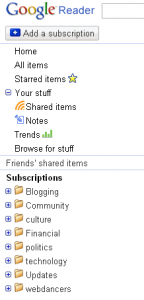
Google ReaderSo the idea is to keep an eye on the sites that interest you, without having to visit each one separately. Let’s take a look at the type of things you might want to monitor. The image at right was taken from my Google Reader screen. To save space, only my subscription categories are shown, not the individual feeds that I’m following. You can probably figure out the kinds of sites that are being followed in each category but a couple of them are worth special mention.

Community is for information that affects me locally. Blogs from my home town and organizations that I belong to.

Updates contains feeds from software and services that I use. For instance, by subscribing to the WordPress Development feed, I make sure that I don’t miss important updates to the software that powers this blog.

webdancers tracks all of the blogs that my company has developed for other people. All businesses can benefit from keeping track of work that they have done for others or by monitoring important voices in their field. Putting all of this information in one place means that you are much more likely to actually see it.

At the moment, I’m subscribed to 69 feeds. This number changes frequently, as I’m particular about what I subscribe to and it’s easy to add and drop feeds as necessary. In Google Reader, you can also share favorite items from your feeds, which automagically appear on a custom web page which, of course, has its own feed for your friends to subscribe to.

Once you start using feeds, you’ll start thinking about using the Internet in a different way. Instead of having to take a specific action (visiting a web site), you have an always-on connection to information that interests you. The feed reader is your side of the connection. On the other side are a myriad of data sources (just look for the little orange RSS icon or the word “feed”). All blogs have feeds and so do many other web sites and online services. I suggest you start with a few blogs and get in the habit of checking your reader regularly.

One last thing, don’t feel that you have to read every item that comes through your feeds. There’s a handy button at the top of the Reader labeled “Mark As Read” and there’s no shame in skipping as many entries as you want. You can be sure that there will be more later.

Technology Tagged: feeds, reader, rss

Humanizing Technology

September 13, 2009 By Greg Falken 2 Comments

audio_console

I like buttons that light up. I was about 15 when I walked into a real recording studio (Ike Turner’s Bolic Sound, in Inglewood, CA) and saw more lit up buttons than I had ever seen in one room before. The engineer in charge, whose name is now lost to me, was very generous with his time; explaining to me how the electrical signals in the recording chain are created by the air pressure changes that enter the microphones when sounds are made. These signals remain in the electronic realm until they are changed back into “sound” by the movement of speakers against the air. This “analog” between air pressure and electrical current is what distinguishes analog from digital recording (a moot point in 1973).

There’s a part of me that loves technology for its own sake, for the coolness factor, for the “ooooh” reaction that I have when, well, buttons light up. I’m sure that’s what originally drew me to the Internet. Now that I am (certainly) older and (hopefully) wiser, I am attempting to apply a more humanitarian view to my understanding and use of technology, particularly the use of the Internet. Here are a few thoughts on how to do this.

Use Your Online Voice

Many years ago, I took a performance class and the instructor told to, “sing as you speak”. In other words, if you’re not sure how to phrase or pronounce something in a song, think of how you would say it in your normal speaking voice. So too online do we need to speak in our natural voice. Techno-speak and sales-speak work very poorly here. If these arcane forms of speech are your natural voice, consider item two, below.

Speak To Be Understood

Closely related to using your online voice is tailoring your speech so that those that you’re speaking to can understand you. Avoid the use of words that your audience won’t understand. If you’re introducing new concepts, try and explain them using metaphors or examples. And if you must use acronyms, make sure they’re completely written out somewhere, at least once.

Sometimes being understood means not writing at all. Lately, I’ve been using screenshots and video screencasts as a substitute for writing out step by step instructions. The people that I’ve sent these to find it much easier to understand, say, how to upload documents to WordPress, when they can listen to me talk them them through the process as they watch it happen on their screen. I’ve been using Jing to create these and it’s dead simple.

Show Your Work

Very few ideas spring up out of nowhere (at least mine don’t). One of the great things about the web is the ease with which we can relate things to one another by linking to them. Using hyperlinks allows us to refer back to the source of an idea, provide additional detail or give credit where credit is due. They allow us to take part in the very human act of sharing, saying in effect, “if you’d like more information, take a look over here”.

These are just three ideas about how to humanize online technology. I’ll be writing more about this in the future and I’d love to hear your ideas too. Please add your comments.

Audio console photo by Steve Manson

Technology Tagged: audio, hyperlinks, Jing, screencast

« Previous Page

Stay in touch

Sign up to receive occasional email updates, including new blog posts.

As a web developer since 1995, I find my attention increasingly drawn to the intersection of computers, the Internet, communication and education. On this blog, I indulge my interest in these and several other topics. I hope you find them interesting too. Read More…

  • LinkedIn
  • RSS
  • Twitter
  • YouTube

Recent Posts

3 Words for 2021

January 1, 2021 by Greg Falken Leave a Comment

The message we should be hearing about masks: An aviation parable

October 24, 2020 by Greg Falken Leave a Comment

3 Words for 2020

January 1, 2020 by Greg Falken Leave a Comment

3 Words for 2019

January 1, 2019 by Greg Falken Leave a Comment

3 Words for 2018

January 1, 2018 by Greg Falken Leave a Comment

Latest Tweets

  • Just now
  • More on Twitter

Search

Tag Cloud

3 Words Aardvark audio bluetooth Chris Brogan Chrome computer contract Crazy Ivan education FCC flying Google google nexus home hyperlocal IndieWeb learning mobile mp3 music mvno net neutrality Network Sierra paleo phone politics posse primal programming QR code Rick Foster Sharon Crost sim skellie social media sonora Strawberry three words Tom Maguire Tuolumne twitter video WordPress writing

Return to top of page
Copyright © 2009–2026 · Website by Webdancers · Log in