
• Home
  • About
  • Webdancers
  • Contact

GregFalken.com

Thoughts on humanizing technology

  • Technology
  • At Home
  • Music and the Arts
  • Education
  • Notes

Bad grammar: stupidity or mendacity?

April 11, 2010 By Greg Falken Leave a Comment

Just Say No to Robo-CallsI received the following email from my friend, noted playwright Rick Foster. While it is not about technology per se, it struck a chord with me and I asked Rick if I could share it on this blog. I also pointed out that this is why he should have a blog of his own.

So I received an automated call this afternoon. A male voice asked if I would take a minute to answer a few very important questions.

I said, “yes”.

The first question was whether I believed that “marriage should be allowed between only one man and only one woman”?

I cringed at the infelicitous phrasing and noted that the two placements of the word “only” within the phrase governed by the preposition “between” meant that the “onlys” modified just the following two words and not the whole prepositional phrase. So an accurate paraphrase of the question would be:

“Do you believe a marriage should be allowed if it involves only one man and only one woman?”

Well, of course I do. So does everyone I know. And as for marriages between some-number-other-than-one man and some-number-other-than-one woman (say a group thing marrying seven men to four women) — well this question solicits no opinion.

Ever vigilant to defend the chastity of my Lady of English Grammar, I suggested to the voice that the question did not accurately solicit the information it wished to obtain.

It informed me that unless I answered “yes” “no” or “repeat the question” it would hang up.

I asked to hear it again, just to make sure. It was as I remembered.

So I answered the question as asked, pretty sure that the owners of the voice would gleefully interpret my “yes” as meaning something that I don’t believe at all.

And I was right, of course. The voice, showing more indignation concerning what it went on to say than pleasure at receiving the answer it hoped for, asked if I knew that Republican Tom Campbell actually supports same-sex marriage.

I can’t say that I really knew that; but I was not surprised as I’ve always respected Campbell’s independence of mind and basic decency. So I lied and said that I did know that. You’re way ahead of me by now; I don’t have to tell you that it soon got down to asking me for money to help defeat Campbell. At this point I had a pang of regret that there was no human brain at the other end of the line to which I could express my opinion of Proposition 8 and those who fanatically support it.

The only question I’m left with is: Do the people paying for this fundraising intentionally misuse basic English in order to deceive the respondent? Or must we revoke their high school diplomas and all subsequently obtained certificates and degrees?

Rick

Image by Mike Licht, NotionsCapital.com
Education Tagged: grammer, Rick Foster, robocall, Tom Campbell

Is We Getting Smarter?

February 12, 2010 By Greg Falken Leave a Comment

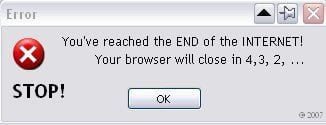
The End of the Internet

I was looking for a new angle on humanizing technology, when along came a fascinating post from Read/Write Web, with much food for thought. Here’s the back-story:

Earlier today, we had a runaway hit of a post that went viral within a few hours, getting unbelievable pageviews and hundreds of retweets and comments.

The trouble was, it wasn’t because of the post’s content. Due to some interesting SEO magic, the post was one of the first search results for the term “Facebook login.” As a result, hundreds of confused readers bombed us with angry comments about how much they hated the “new Facebook,” a.k.a. our Facebook Connect comment login.

In other words, due to some misdirection from Google, a significant number of people thought that they should be able to log in to Facebook from a Read/Write Web blog post and were most unhappy that they had a hard time doing so.

Rather than (or in addition to) having a good laugh at these folk’s expense, writer Joile O’Dell asks some very good questions about the average person’s experience online.

How can we balance making the Web simple enough for all users while still creating tech cool enough to satisfy geeks like us? And who says either group – nerds or users – is “normal,” anyway?

Those of us who build the applications that people see and use online have a really hard time seeing our work through their eyes. And, truth be told, we don’t always want to, ’cause it’s less fun.

You and your geek friends != middle aged moms. And your users are often statistically more likely to be middle-aged moms.

And most of them have no idea what a web browser is or how it differs from a search engine or a social network. They’ve chosen to be smart about other things, like building cars or making art or raising families. I’ll bet some of them are terrific dancers. We have to build the Web for them, too.

Now while it’s true that most middle-aged moms aren’t geeks, neither are they dumb. I recently spent several days in an office full of mostly middle-aged women, helping them transition from a Microsoft Exchange/Outlook email system to Google Apps. Some were more tech savvy than others but they were all  more than willing to learn a new set of unfamiliar tools in order to help them do their jobs better. (It helps that they are doing incredibly valuable work at the Area 12 Agency on Aging.)

Many of the comments in response to the Read/Write Web post were of the “who cares, they’re a lost cause” variety, a view I’ve sometimes held myself. However, as the Internet spreads through society, there is an increasing middle ground between technology geeks and the terminally clueless. When the technology meets a need, most of these middle grounders are willing and able to make the stretch and learn something new.

In a perfect world, tech products would be intuitive and fun to learn and use. In today’s world, the Internet is hard and I can’t think of an application that’s not at least occasionally infuriating. The best hope I can offer is that some applications are getting easier to use, at the same time that many consumers are getting smarter about using them. At some point, they’re going to meet in the middle. In the meantime, we need to focus on finding tools that actually do a job that needs doing and not worry too much about the rest.

Error message by delade.

Technology Tagged: Facebook, learning, Read/Write Web

Broadband Mapping in the Motherlode

February 8, 2010 By Greg Falken 1 Comment

Here there be dragonsA-TCAA Central Sierra Connect needs your help with mapping broadband in our region (Amador, Alpine, Calaveras, Mariposa and Tuolumne counties). Please follow this link to the “crowdsourcing” module, created by Solstice Geospatial, to help map our area’s broadband footprint. On this site, you can put in your address (for home and/or business), take a speed test to see how fast your service is and, after pinning your location on the map, tell them who your provider is, how much your service costs, and any comments you have about your service. All information remains completely confidential.
Please pass this link on to all of your contacts and friends in our region, so that we can make this the most complete and accurate map in California!

Direct link to crowdsourcing module: http://mshelton.kattare.com/bbcrowdCSC/bbCSC.html

At Home Tagged: crowdsourcing, map, Soltice Geospatial

What’s In a (Domain) Name?

January 28, 2010 By Greg Falken 2 Comments

DomainsI recently exchanged some tweets with someone who was trying to update her organization’s web site but didn’t have sufficient access to do so. She had a pretty good grasp of what she needed to accomplish but was  being blocked at every turn. It made me think that, while modern site building tools have brought the ability to edit content to the masses, there are still many management functions that require an understanding of how web sites and, indeed, the Internet as a whole, works.

I thought this would be a good opportunity to recycle a post that I wrote in 2008 about that most basic building block of the Internet, the domain name.

Master of Your Domain

Every business and many individuals need their own domain name. This unique alpha-numeric address becomes the name used to identify you in a web site URL or an email address. The great things about a domain name are that 1) you own it and 2) it is portable anywhere on the Internet. You keep the same identity, regardless of which Internet Service Provider (ISP) or hosting company you use. There is however, a lot of confusion about how to register and then use a domain name, as well as their actual function in the structure of the Internet.

Why a domain name?

Every computer on the Internet (even yours) has an address and, being machines, these addresses are numeric. They are referred to as IP Addresses (for Internet Protocol) and they are written in dotted-decimal notation; four numbers, each ranging from 0 to 255, separated by dots (e.g. 147.132.42.18). Even in the early days, when the Internet was used mainly by computer scientists and academics, they realized that referring to everything on the Internet using dotted-decimal notation was not going to fly. So a system was devised to use a domain name interchangeably with its IP Address. In other words, a domain name is a pointer to an IP Address.

In the beginning (and up until 1998), all domain names were registered and maintained by a single entity, called InterNIC (Internet Network Information Center). It was a fairly technical (and expensive) process to use but it had the advantage of being orderly. After that, the business of registering domain names was semi-privatized and domain name registrars began sprouting like mushrooms. The best news about this was that prices dropped drastically. The bad news was that many of them were no less confusing to use, some adopted predatory business practices and others went out of business in relatively short order. But love them or hate them (and I know of few people who love them), the domain name registrar is the first stop in acquiring your own domain name.
Note that many hosting companies (i.e. companies that provide web site and email services) are also domain registrars. You can often get a package deal for domain name registration and hosting services but it is not required that you use the same company for both functions. Where ever your domain name is registered, make sure that you retain control over the domain name record (see below).

What’s in a name?

This is the last bit of technical information, I promise. Every domain name ends in a top-level domain (TLD), the letters after the last dot. The most common TLDs are .biz, .com, .edu, .gov, .info, .int, .mil, .name, .net and .org. You can use any of these TLDs in your own domain name, except that .edu domains must be registered by educational institutions and .mil domains are reserved for the U.S. military.

There are other TLDs, such as two letter country codes and those that are privately administered (such as .mobi, for mobile devices) but these are beyond the scope of this post.

The portion of the domain name before the last dot is where you can get creative. However, you are restricted to the letters a-z (case does not matter), the numbers 0-9 and the hyphen. Spaces are not allowed. This part of your name must be unique across the entire Internet. It has long been true that there are no English, single-word domain names available for registration. If there is one that you must have, you may be able to buy it from its registered owner, as transfers are allowed. If you owned a name like fund.com, you too could sell it for $10 million.

You may have noticed a second dot in some domain names. The name before this dot is called the sub-domain. These names do not need to be registered, since they are guaranteed to be unique by being attached to your primary domain name. Sub-domains are used to divide domains into logical areas, like a web site, a blog or a media server. The most common sub-domain is “www” and this is usually aliased to the same IP Address as the primary domain name. Note that sub-domains require configuration in your domain’s DNS record and that’s the next step in the process…

Don’t you hate it when people lie to you?

I know I said there would be no more technical stuff. You believed that? When you register a domain name, you fill out a bunch of information that becomes your domain name record. This record is held by the domain name registrar and you should have access to this record. Now listen to me: make sure you have (and keep track of) the username and password that gives you access to your domain name record. It can be a huge pain if you don’t have access to this record when you need it (like when you decide to move your web site and email to a new hosting company).

A very important part of your domain name record is the location of the nameservers for this domain. A nameserver is a computer on the Internet running DNS (Domain Name System) software, which is usually operated by an ISP or hosting company. Its location is expressed as a domain and subdomain (e.g. ns.hostingcompany.com) and there are usually at least two of them, for redundancy. Its purpose is to resolve domain names to IP addresses. If a nameserver cannot resolve the address locally, it will search other DNS servers for the correct record, a process called DNS recursion.

For each function that your domain will perform (web site, email, sub-domains, etc.) there will be one or more records in DNS, on the nameservers specified in your domain name record. Don’t worry, you should never have to deal with these records directly but your ISP or hosting company will.

If you decide to change the location where your web site and email are hosted, the location of these nameservers may also change. See why it’s important to have access to your domain name record?

Where to register

There are two types of registrars: those who are accredited by ICANN (Internet Corporation for Assigned Names and Numbers) and everybody else. There are several hundred accredited registrars worldwide and thousands more who resell though them. For what it’s worth, I use GoDaddy.com as my registrar, although I don’t use them for any other services. I find their prices reasonable ($7 – $10 per year, depending on TLD type) and I like their administrative interface for managing multiple domains. The amount of advertising and upselling they do during the purchase process is pretty irritating though. Just keep clicking the links that say, “no thanks, go directly to checkout”.

Conclusion

Registering your domain name independently from your hosting provider gives you the most flexibility when setting up Internet services. Your domain registrar and hosting company or ISP work together but need not be the same company. When you purchase a domain name, its domain record resides with the registrar. Within that record is a list of the nameservers that have knowledge of your domain name and the corresponding IP Addresses of the computers on which your various domain services are hosted.

References:

http://en.wikipedia.org/wiki/Domain_name
http://en.wikipedia.org/wiki/Domain_Name_System
http://en.wikipedia.org/wiki/Domain_registrar

Image by A. www.viajar24h.com

Technology Tagged: DNS, domain, hosting, registrar

Put Your Business On the Map

January 18, 2010 By Greg Falken 1 Comment

Hand Drawn Map

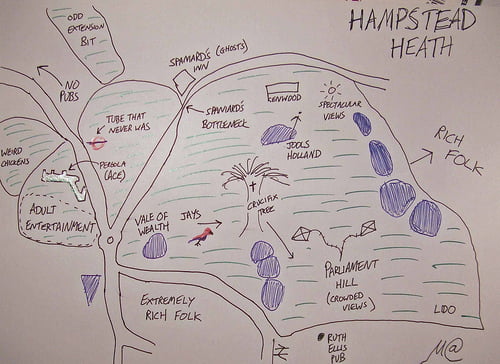
Surprisingly, owners of small, local businesses share a common interest with mega-corporation Google, Inc.  One of Google’s goals is to know what people are looking for so well that they don’t even have to search for it.  Try this: type the word “weather” into the Google search box (on the Google site, not in your browser’s toolbar).  Before you even click Search they have displayed a weather forecast for the location from which you are connected to the Internet.

This is just one of the first steps towards becoming aware of the context in which you are seeking information, in order to return more relevant results.  Mobile devices equipped with cameras and GPS can be even more aware of their surroundings, providing Google with even more information to work with, presumably leading to ever more tailored results.  Remember that Google is in the business of providing advertising to as many eyeballs as humanly possible and they seem to have determined that the best way to do this is to be relentlessly useful.

Google’s famous slogan, “don’t be evil”, can be debated at this point but that’s not the subject of this post. If you are a small business owner, it is almost certainly in your interest to provide Google with as much information as you can.  One way to do this is through the free Google Local Business Center (http://google.com/lbc).  The LBC is a part of Google Maps, although information entered there is shared with Google Search results.  Here, watch the ad:

http://www.youtube.com/watch?v=hjeCmHwqVpU

Here’s the thing: if they don’t get the information from the business owner, they’ll get it from somewhere else, such as an online Yellow Pages provider.  That information is likely to be incomplete, at best.  Businesses should be in control of their own information, especially when they’re given a ready-made tool, such as the LBC.

I have a challenge for my own local community of Sonora, CA.  Let’s get every business in  Tuolumne County to claim their listing or add a new one if it doesn’t exist.  Keep those listings up to date, link it to your web site, add coupons (yes, you can do that), solicit reviews and use this free tool to its full potential.  Tourists and locals alike search these listings every day and I’d like to know if providing them with better information can have a positive effect on our business’ bottom line.

Please let me know in the comments when you give this a try and what your experience is (even if you’re not from Sonora).  Take a few minutes and put your business on the map.

Map by Matt Brown.

Technology Tagged: Google, maps, small business

« Previous Page
Next Page »

Stay in touch

Sign up to receive occasional email updates, including new blog posts.

As a web developer since 1995, I find my attention increasingly drawn to the intersection of computers, the Internet, communication and education. On this blog, I indulge my interest in these and several other topics. I hope you find them interesting too. Read More…

  • LinkedIn
  • RSS
  • Twitter
  • YouTube

Recent Posts

3 Words for 2021

January 1, 2021 by Greg Falken Leave a Comment

The message we should be hearing about masks: An aviation parable

October 24, 2020 by Greg Falken Leave a Comment

3 Words for 2020

January 1, 2020 by Greg Falken Leave a Comment

3 Words for 2019

January 1, 2019 by Greg Falken Leave a Comment

3 Words for 2018

January 1, 2018 by Greg Falken Leave a Comment

Latest Tweets

  • Just now
  • More on Twitter

Search

Tag Cloud

3 Words Aardvark audio bluetooth Chris Brogan Chrome computer contract Crazy Ivan education FCC flying Google google nexus home hyperlocal IndieWeb learning mobile mp3 music mvno net neutrality Network Sierra paleo phone politics posse primal programming QR code Rick Foster Sharon Crost sim skellie social media sonora Strawberry three words Tom Maguire Tuolumne twitter video WordPress writing

Return to top of page
Copyright © 2009–2026 · Website by Webdancers · Log in