
• Home
  • About
  • Webdancers
  • Contact

GregFalken.com

Thoughts on humanizing technology

  • Technology
  • At Home
  • Music and the Arts
  • Education
  • Notes
Escape From the Walled Garden

Escape From the Walled Garden

April 7, 2014 By Greg Falken 6 Comments

I’ve started a little experiment here on gregfalken.com, in an attempt to gain some independence from the Facebook and Twitter data silos. This work is inspired by the folks at IndieWebCamp.com, who are building tools that allow website owners to host their own data, while also sharing it on other social media networks. The goal, as stated on their website:

Your content is yours
When you post something on the web, it should belong to you, not a corporation. Too many companies have gone out of business and lost all of their users’ data. By joining the IndieWeb, your content stays yours and in your control.

You are better connected
Your articles and status messages can go to all services, not just one, allowing you to engage with everyone. Even replies and likes on other services can come back to your site so they’re all in one place.

You are in control
You can post anything you want, in any format you want, with no one monitoring you. In addition, you share simple readable links such as mywebsite.com/ideas. These links are permanent and will always work.

You’ll see that the top menu now has a “Notes” item. Posts in this category contain items that I would normally put on Facebook or Twitter. By posting them here, I can both maintain ownership of my content and better control what it looks like. I’m using the Social plugin by MailChimp, to publish these posts on Facebook and/or Twitter too.

Other IndieWeb enhancements to the site that aren’t visible include IndieAuth, Microformats, and Webmention (thanks to Andy Sylvester for the helpful Webmentions video). I’ll report more on these as I gain more experience with them.

I have kept the Notes posts separate from more fully formed posts like this one, by excluding them from the “Blog” page and the main RSS feed of the site. They also will not trigger an automatic email to people who have subscribed to my mailing list. They are meant to be an online collection of tidbits that I find of interest.

How my Notes posts appear on Twitter and Facebook is still something of a work in progress. If you see anything there that looks odd, please leave me a comment here. Speaking of comments, you can still leave them anonymously or you can sign in using your Twitter or Facebook account, thanks to the aforementioned Social plugin. Let me know how if you find this feature useful too.

Technology Tagged: IndieWeb, microformats, social media, webmention

An Update On Net Neutrality

An Update On Net Neutrality

February 20, 2014 By Greg Falken Leave a Comment

Net Neutrality is one of those things that I care about and think is important, yet find a bit too large to grasp. Since it has been in the news recently, with a new Notice of Proposed Rulemaking from the FCC (see why it’s hard to grasp?) and related editorials about the threat to the Internet as we know it, I thought it would be a good time to review.

First, a definition of Net Neutrality from Wikipedia:

Net neutrality (also network neutrality or Internet neutrality) is the principle that Internet service providers and governments should treat all data on the Internet equally, not discriminating or charging deferentially by user, content, site, platform, application, type of attached equipment, and modes of communication. The term was coined by Columbia media law professor Tim Wu.

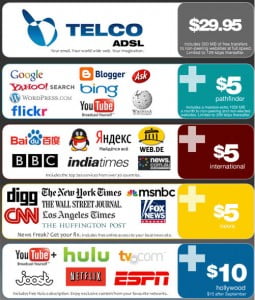
Net NeutralityWhy should we care? Take a look at the scary infographic to the right.  Do you doubt that your ISP would jump at the chance to boost its revenue by charging à la carte for popular services? There are obvious conflicts between an ISP that also provides content (*coughComcast*) and content providers like Netflix and Amazon Prime, who rely on the ISPs to deliver their data. There is no conclusive evidence today that content providers are being throttled (and Verizon strenuously denies it) but that may be because the FCC hasn’t issued any rulings that have been upheld in court.

The FCC has tried to come up with rules that will enforce the principals of Net Neutrality but hasn’t been able to get it quite right. In January, a federal appeals court ruled that the FCC had exceeded its authority, writing:

Even though the Commission has general authority to regulate in this arena, it may not impose requirements that contravene express statutory mandates. Given that the Commission has chosen to classify broadband providers in a manner that exempts them from treatment as common carriers, the Communications Act expressly prohibits the Commission from nonetheless regulating them as such. Because the Commission has failed to establish that the anti-discrimination and anti-blocking rules do not impose per se common carrier obligations, we vacate those portions of the Open Internet Order.

What this means (I think) is that the FCC doesn’t have the authority to apply these rules to the class of companies that they were trying to. They would need to classify companies like Verizon and Comcast as common carriers, as they do phone companies. The FCC has decided not to appeal this ruling but rather to propose new rulemaking called “Protecting and Promoting the Open Internet.”

The FCC states:

The DC Circuit recognized the importance of the Open Internet Order’s ban on blocking Internet traffic, but ruled that the Commission had not provided sufficient legal rationale for its existence. We will carefully consider how, consistent with the court opinion, we can ensure that edge providers are not unfairly blocked, explicitly or implicitly,from reaching consumers, as well as ensuring that consumers can continue to access any lawful content and services they choose.

So, the FCC is rewriting its rules and hoping they can codify agreements like those that they have in place with Comcast, which were made as part of its acquisition of NBC Universal. However, as ReadWrite points out:

The problem with that approach: The primary reason the FCC’s ability to regulate net neutrality was shot down by the DC Circuit appeals court was in how the Commission classifies broadband providers like Time Warner Cable, AT&T, and Comcast. The FCC does not classify these companies as public utilities (like water or power companies) but more as content and media companies.

Activist groups and Democratic members of Congress have asked the FCC to reclassify the Internet providers in a way that would make them subject to more government regulation and oversight, but it has not yet done so, which strikes us as puzzling, given that a court has shot down its ability to regulate these companies as things stand.

Will the FCC’s new rules make a difference in net neutrality, or is the Commission just attempting to assert its relevance on a topic that it believes it should have the power to enforce?

The FCC is seeking public comment and expects to have the new rules written by early summer. We should expect to hear more then.

Technology Tagged: FCC, net neutrality

How To Report a Bug

December 26, 2013 By Greg Falken Leave a Comment

BugOver many years of building and managing websites, I’ve seen a lot of errors, bugs and puzzling behavior. I’ve also received lots of calls for help when things go wrong, both from site owners and other concerned users. Unfortunately, most of these reports give me only a vague idea of what (if anything) is broken and how to go about fixing it.



Understand that I’m not trying to blame the messenger; fixing websites is my job. However, it would make my life a lot easier and get those websites fixed faster, if more people understood how to report a problem. Instead of emailing me to say, the site is broken, please fix it, start by answering these three questions:

  1. What were you doing?
  2. What did you expect to happen?
  3. What actually happened?

Veteran programmer Dave Winer explains:

All three parts are very important. If you really did discover a bug, the programmer will need to know what you were doing so he or she can try to reproduce it. If they can’t, it will be next to impossible to fix it.

The second part helps nail down the first part. Usually people know what they were expecting. Also, it’s possible that what you were expecting isn’t what the software does. An extreme example: “I was expecting that when I pressed the blue button at the bottom of the screen I would be granted three wishes.”

For the third part a screen shot can help. It may contain information that’s meaningful to the programmer that you wouldn’t think to include in your report.

In order to fix most problems, they must be reproducible. Quite often, people on the Internet experience glitches (a technical term) that come and go quickly, the causes of which will never be known. On the other hand, some bugs that are quite real occur only as part of a specific series of steps and can be maddening to track down. In most cases, more explanation is better. Be verbose. As programmer Simon Tatham says,

The first aim of a bug report is to let the programmer see the failure with their own eyes. If you can’t be with them to make it fail in front of them, give them detailed instructions so that they can make it fail for themselves.

Following these steps when reporting problems can be useful in other troubleshooting situations too. Your auto mechanic would be thrilled if you were to tell him, “I was trying to start my car and expected the engine to turn over. Instead, when I turned the key in the ignition, it just made a clicking sound.” You, my friend, are on your way to getting your car fixed.

So please, report website problems when you find them using the three step process. Your web developer will thank you and your website will be on its way to working properly again.

Bug vector graphic by Vectorportal.
Originally published on Sierra Online Services.

Technology Tagged: bugs

A Desktop Wallpaper Gift from Trey Ratcliff

A Desktop Wallpaper Gift from Trey Ratcliff

December 16, 2013 By Greg Falken 4 Comments

If you use your computer all day long, like I do, you know the importance of good desktop wallpaper. The wrong image can nag at you, break your concentration or make it uncomfortable to sit in front of your screen. Most people also use their desktops to personalize an otherwise unfeeling machine. Just look at the screens of the people around you: some have kids, some are nature lovers and some…well, you just wonder about them.

A year ago, photographer Trey Ratcliff gave away 1,000 free HD wallpaper images on his Google+ page, posting them under a Creative Commons noncommercial license. This means you can use them for personal stuff, like desktop wallpapers or phone backgrounds, your personal blog, etc. These are gorgeous images by one of the world’s top photographers. If you need them larger than 2500 pixels across, you can also download them full-size from his personal portfolio site.

Desktop wallpaper hints

  • Use a photo editing program to resize the image to the dimensions of your monitor(s). In Windows 7, right-click anywhere on the desktop and select “screen resolution” to find your screen size (other operating systems: you’re on your own).
  • If you have dual monitors, you can stretch the image across both of them by doubling the width of your image, then selecting “tile” as the picture position (again, in Windows 7).
  • Experiment with images until you find one that works well when it’s partially covered up, as it will be for much of the time you’re looking at it. I like fairly abstract or geometrical images for this reason.
  • Have fun!

The SpiralMy current wallpaper, “New Spires” (above) replaces this equally beautful image of a spiral staircase that is part of this wonderful collection. Thanks, Trey for your generosity.

Technology Tagged: computer, Trey Ratcliff, wallpaper

What Monty Hall Can Teach Us About Blogging

September 27, 2013 By Greg Falken Leave a Comment

Monty HallI just listened to Marc Maron’s interview with Monty Hall, of Let’s Make A Deal fame. Whatever you think of Marc Maron’s comedy (I’m a fan), he’s a great interviewer and his talks with elder comedy statesmen such as Carl Reiner, Mel Brooks and Dick Van Dyke are not to be missed.

Monty Hall told this story of his time in the early 50s as a struggling radio and television performer. He was living in Toronto with his wife and two children and making regular trips to New York City to try and find more and better work. Each time he went to New York he would try and meet with as many network TV and radio producers as possible but was having very little success.

As part of his campaign to find work, we wrote a weekly Memo From Monty, describing the past week’s trials and tribulations. This memo was mailed to all of the producers who continued to refuse to meet with him. This went on for several months and eventually he stopped sending them.

Shortly after that, he got a call from a producer at NBC, offering him a job as a game show host (not Let’s Make A Deal).

During the conversation, the producer asked, “What happened to Memo From Monty?”

Hall responded, “You read that?”

“Of course, I looked forward to it every week”, the producer said.

As I listened to this story, it occurred to me that Monty Hall was blogging, using carbon copies and the postal system. He was, in today’s terms:

  • Providing something of value (an entertaining letter) in exchange for the attention of the reader.
  • Remaining “top of mind” for the time when his services were needed.
  • Delivering “appointment viewing”, to people who looked forward to hearing from him.
  • Developing a network of people who would listen to what he had to say (or at least open his mail).

He also had the ability to persevere. Landing this job took months and his biggest successes were still years in the future. And he never got a single response to his memos until someone called to say “yes”.

The rest of the interview was equally interesting. You can listen or download here for the next six months. Note: the portion of the podcast prior to the interview contains explicit language.

Technology Tagged: blogging, Monty Hall

« Previous Page
Next Page »

Stay in touch

Sign up to receive occasional email updates, including new blog posts.

As a web developer since 1995, I find my attention increasingly drawn to the intersection of computers, the Internet, communication and education. On this blog, I indulge my interest in these and several other topics. I hope you find them interesting too. Read More…

  • LinkedIn
  • RSS
  • Twitter
  • YouTube

Recent Posts

3 Words for 2021

January 1, 2021 by Greg Falken Leave a Comment

The message we should be hearing about masks: An aviation parable

October 24, 2020 by Greg Falken Leave a Comment

3 Words for 2020

January 1, 2020 by Greg Falken Leave a Comment

3 Words for 2019

January 1, 2019 by Greg Falken Leave a Comment

3 Words for 2018

January 1, 2018 by Greg Falken Leave a Comment

Latest Tweets

  • Just now
  • More on Twitter

Search

Tag Cloud

3 Words Aardvark audio bluetooth Chris Brogan Chrome computer contract Crazy Ivan education FCC flying Google google nexus home hyperlocal IndieWeb learning mobile mp3 music mvno net neutrality Network Sierra paleo phone politics posse primal programming QR code Rick Foster Sharon Crost sim skellie social media sonora Strawberry three words Tom Maguire Tuolumne twitter video WordPress writing

Return to top of page
Copyright © 2009–2026 · Website by Webdancers · Log in