
Since starting my experiment with IndieWebCamp and POSSE (Publish (on your) Own Site, Syndicate Elsewhere), I’ve learned quite a lot about syndicating content from my own website out to Facebook and Twitter and receiving comments back from those services. I thought it would be helpful to share some of this information and the tools that make it possible.
WordPress plugins make syndication possible. These are the plugins currently in use:
Brought to you by MailChimp, Social is a lightweight plugin that handles a lot of the heavy lifting of making your blog seamlessly integrate with social networking sites Twitter and Facebook.
Seamlessly might be a bit of a stretch but it does work as advertised. Social adds a publishing option to each new post, that allows for automatic or manual posting to multiple Facebook and Twitter accounts. I suggest posting manually, as each of these services calls for very different formatting.
After a post is published by WordPress, you have the option of broadcasting the post as well. The broadcast post contains a link back to the post on your site. Facebook will show the first couple of hundred characters of text in the website post, so you have to be careful not to repeat yourself in the status message. Twitter shows as many characters as possible up to the 140 character limit, after deducting for the link back to the post.
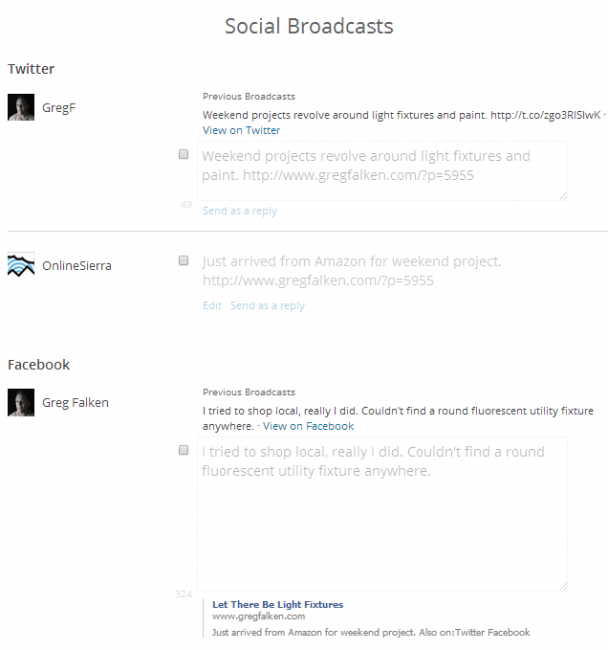
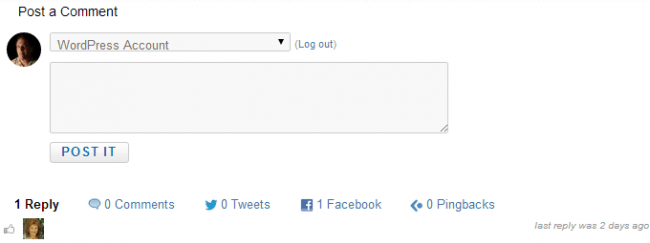
The other half of Social monitors the posts that have been broadcast and pulls comments, shares and likes back to the comment section of the post. It also replaces the standard WordPress comments with its own, which allows visitors to sign in using their Twitter or Facebook accounts (or post anonymously). One of the unfortunate side effects of this is that you will give up the default comment styling of your theme. I had to do some tinkering in style.css to make the formatting look decent.
Adds microformats2 classes to your WordPress theme. It is only a very basic implementation, because not every element is accessible through actions or filters. I would recommend to use a theme that supports microformats2, like SemPress.
Since I didn’t want to give up my theme, I installed this plugin, which has to be downloaded from the author’s GitHub page and then uploaded to the website via FTP.
The effect of having Microformats on the site isn’t immediately apparent but they are a step in the IndieWeb process. Their definition reads:
Microformats are extensions to HTML for marking up people, organizations, events, locations, blog posts, products, reviews, resumes, recipes etc. Sites use microformats to publish a standard API that is consumed and used by search engines, aggregators, and other tools.
Webmention is a simple way to automatically notify any URL when you link to it on your site. From the receivers perpective, it’s a way to request notification when other sites link to it. It’s a modern alternative to Pingback and other forms of Linkback.
Again, download from GitHub and upload via FTP. Any site using Webmentions can tell when your site links to it, giving the website owner a chance to respond.
WP Facebook Open Graph protocol by Chuck Reynolds
This plugin adds well executed and accurate Facebook Open Graph Meta tag information to your site. The idea is to keep minimal settings and options as to remain out of your way and in the background while still proving a powerful Open Graph plugin for your WordPress site. This plugin works on Facebook, Google Plus, and Linkedin.
This plugin gives Facebook a better shot at properly displaying the link to your post, the post’s description and particularly the thumbnail image. Here’s how it chooses the image:
The plugin will first look for a featured image. If there isn’t one or your theme doesn’t have those available, then it will pull the image(s) in the post/page content. If that isn’t there either, then it will default to using the image you put into the plugin settings in the admin panel. If THAT isn’t there then… well you fail and you won’t have an image and we’ll put a comment in your source to remind you to add one as Facebook requires one.
Function.php
These are a couple of blocks of code that I added to my theme’s function.php file. Because I wanted my “notes” category to be somewhat independent of the rest of my blog, I added this code to prevent “notes” from being mixed in with the other posts on the home page:
//* Exclude the 'Notes' category from the loop
 function exclude_category($query) {
 if ( $query->is_home() ) {
 $query->set('cat', '-190');
 }
 return $query;
 }
 add_filter('pre_get_posts', 'exclude_category');
This one removes the “notes” category from the RSS feed, so that it doesn’t trigger my mailing list.
//* Exclude the 'Notes' category from the feed
function myFeedExcluder($query) {
if ($query->is_feed) {
$query->set('cat','-190');
}
return $query;
}
add_filter('pre_get_posts','myFeedExcluder');
If you use this code, replace ‘-190’ with the ID of the category on your blog.
If you have any questions, I’ll do my best to answer them in the comments. If you feel inspired to POSSE-enable your own site please let me know about that too.
Great post, Greg!! All good to know about. Based on the way I write, I do tend to publish manually to each site, though!
Thanks, Walter. I would have been OK with publishing manually too but I think there’s real value in collecting all of the responses back in one place. So far, I’ve only been able to do that with posts that have been published through the Social plugin.
This is great Greg. Thank you. I’m converting my content and online presence to POSSE. It even inspired me to go back to WordPress from Ghost. Ultimately, I’d like to syndicate content to a few places, but always have my site and identity as the home base, so I’m hoping WP has the JSON Rest ability to handle that.
1. Is there a way to handle web mentions without comments? I’m going to use Muut for comments so I can mirror comment section across sites. I haven’t tested it yet, but I don’t think web mentions will get written into the database and displayed if I’m using Muut.
2. How have you setup your notes to differentiate from other posts? I thought about using a custom content type, but this seemed like overkill and meant I’d miss out on posting via the WP app, which is surprisingly good.
Thanks for the great post.
Jason, take a look at https://www.brid.gy/, which can pass comments and likes back to a site from Twitter, Facebook, Google+ and Instagram. As with most of these tools, it’s still a work in progress.
Notes are just a WordPress category which I’ve excluded from the main loop and RSS feed. I didn’t see a need for anything more complex than that. Thanks for the comment and I’m glad you found the post helpful.