• Home
  • About
  • Webdancers
  • Contact

GregFalken.com

Thoughts on humanizing technology

  • Technology
  • At Home
  • Music and the Arts
  • Education
  • Notes

Find the Need

October 1, 2009 By Greg Falken Leave a Comment


To paraphrase George Bernard Shaw, web developers and their clients are often people separated by a common language. I was recently working on an initial site design with a client who asked me to make it more “grounded”. I was initially at a loss and I bit back my first response of, “what color is grounded?” Instead, I kept asking questions and trying to reflect back the answers to make sure that what I had heard was accurate. We didn’t come up with a design at that meeting (although I did come back with one later that she liked much better) but what emerged was the client’s very strong need to see herself well represented by her web site. This is a perfectly reasonable request, one which any web developer ignores at his peril.

I have been practicing a technique for some time now called Nonviolent Communication, created by Marshall Rosenberg, Ph.D. His belief is that all people’s feeling and actions are driven by their needs, either met or unmet, and that those needs are universal. They include trust, safety, respect, integrity, understanding, being understood, and many more. When we empathize with and express an understanding of the needs of other people, it will often get us past barriers to communication, such as I experienced with the color of “grounded”.

Extending this theory into the online world, when people visit web sites, blogs or social networks, they do so in an attempt to meet needs. The better we are at anticipating those needs, the more likely we are to facilitate meeting them. And if we can do that, we become heroes. At just about any stage in the development process, it’s worth asking the question, “what need are we trying to meet here?” Some needs that might be met at various stages of an online experience could be clarity, comfort, security, fun, trust, contribution, connection, etc. Meeting these needs becomes a high-level goal in the development process and can guide decisions made about implementing specific features. If a feature doesn’t contribute to meeting a need, it’s probably unnecessary.

Focusing on needs can bypass a lot of the imprecision that comes with people describing what they “want”. Clients often come to us with a  very detailed description of what they want a particular function to do. In these cases, it’s important to find out what need (or goal, if you like) will be met if this function works in exactly the way they expect it to. What we usually find is that there is some more effective technical means of meeting the need than the one they have described. By cutting straight through to the need, we can streamline the process, allowing each of us to do what we do best; the client focusing on their business strategies and the developers coming up with the means of achieving them based on the technology at hand.

Understanding the needs of the users of a site also requires empathy. First, in assessing which need you are trying to meet and then again in trying to gauge the users’s response to the strategies you have employed. For example, in designing an e-commerce checkout system, there is a need for clarity (the user must know what information is required and what their options are), security (they must feel that financial information is safe) and trust (they must believe that you will deliver the goods that they have purchased). If any of these needs are not met, they are quite likely to feel frustrated, concerned or angry, making it far less likely that they will actually complete a purchase.

Of course, simply identifying needs is not enough to produce a great online experience. There is still the need for planning, design and execution. But striving to meet the needs of everyone involved (including the developers!) must remain in the forefront during the development process and, indeed, throughout the life cycle of the project. They are a touchstone to return to often, when things are working well and especially when they are not.

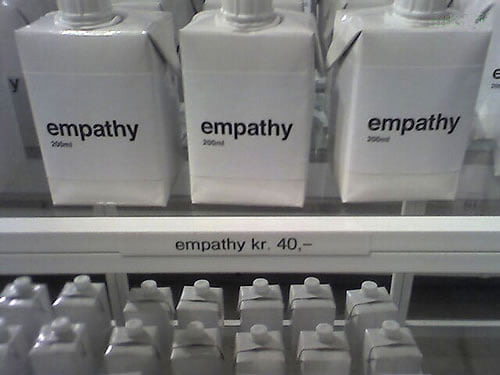
Empathy photo by Geoff Jones.

Technology Tagged: development, empathy, Marshall Rosenberg, needs, Nonviolent Communication

Into the Flow We Go

September 22, 2009 By Greg Falken 8 Comments

Flowing Stream

This blog is rssCloud enabled. How would you know? You probably won’t. Should you care? Probably not today. Why did I bother? Well, you know that I like buttons-that-light-up. But seriously, there will be a benefit, as rssCloud and other real time web technologies pick up steam.

A definition: Use of the <cloud> tag — which has been an unused part of the RSS specification since 2001 — allows feed readers and aggregators (like Google Reader, although they don’t yet support rssCloud) to receive nearly instant notification when the feed is updated. Currently, it can take anywhere from a few minutes to a few hours. So, if you were following this blog using an enabled feed reader (and there are very few of them today), you would get new material within seconds of me clicking the Publish button. For most people, their immediate response to this exciting new prospect is, “um…so?”

But there’s more at play here than first meets the eye. Here’s what Dave Winer, the father of RSS, has to say about the use of rssCloud by people like you and me:

The idea is to deliver news faster, without relying on a single company to do all the work.

Until now you could have one or the other, but not both.

You could have the news delivered via RSS, but if you wanted it fast you had to go to Twitter or Facebook or FriendFeed.

The problem with going to a company is two-fold: 1. The company might not be able to handle it. 2. The company might screw with it.

The important idea here is that this method of delivering information is decentralized and beyond the control of a single company, just like the Internet itself. To learn more, take a listen to this Rebooting the News podcast. The first half of the show is Q&A about rssCloud.

http://mp3.morningcoffeenotes.com/reboot09Sep14.mp3

Why real time?

It’s perfectly reasonable to be wondering if we should really be trying to speed up the flow of information. Don’t we already have too much coming at us too fast? However, it appears that the real time web is more than just faster communication, it’s a different form of communication. Writing in ReadWriteWeb, Ken Fromm says:

As with other recent waves of innovation (Web 2.0 and cloud computing, for example) there is no single definition of what the term “real-time Web” means. As a result, it is used as a catch-all phrase for a number of developments underway. At this point, we can identify that the real-time Web…

  1. is a new form of communication,
  2. creates a new body of content,
  3. is real time,
  4. is public and has an explicit social graph associated with it,
  5. carries an implicit model of federation.

…Another characteristic of the real-time Web is that it gives the world a new body of content, one that, unlike IM or email’s, is largely public. Plus the underlying APIs allow third parties to make use of the data through programs, thus extending the reach of the content.

The real time web may have the most impact on what we now call news reporting. With the public growing increasingly dissatisfied with traditional news outlets (as evidenced by their frightening decline in revenue), new sources of information are springing up online. Instead of being spoken down to by the mass media, who decide which stories are worthy of our attention, we can speak “across” to one another about anything that catches our interest. Some people will naturally do this better than others and they will gain a following.

Once we have this raging stream of information, we will need better tools for managing and making sense of it all. Those tools are in the future but, I suspect, not the far distant future. RssCloud (and pubsubhubbub, a related technology) are starting to work at a low level to direct the stream in such a way that we can all dip into it. I think we’ll be using it sooner, rather than later, which is why this blog is rssCloud enabled.

Streaming waters photo by Mikael Miettinen

Technology Tagged: Dave Winer, mp3, podcast, pubsubhubbub, real time web, rssCloud

FCC Support for Net Neutrality

September 21, 2009 By Greg Falken Leave a Comment

FCC

Net neutrality was in the news quite a bit in 2007-2008.  A neutral network is one that is free of restrictions on content, sites, or platforms, on the kinds of equipment that may be attached, and on the modes of communication allowed.

In what is very good news for the future of open access to the Internet. FCC Chairman Julius Genachowski has posted a statement on Broadband.gov (cross-posted on Whitehouse.gov and Huffington Post) entitled, The Open Internet: Preserving the Freedom to Innovate. In it, he suggests that the role of the FCC is be the “smart cop on the beat” in supporting free and open access to the Internet. To this end, he proposes two new FCC rules:

The first says broadband providers cannot discriminate against particular Internet content or applications. The second says broadband providers must be transparent about their network management practices. These principles would apply to the Internet however it is accessed, though how they apply may differ depending on the access platform or technology used. Of course, network operators will be permitted to implement reasonable network management practices to address issues such as spam, address copyright infringement, and otherwise ensure a safe and secure network for all users.

I also proposed that the FCC formally enshrine the four pre-existing agency policies that say network operators cannot prevent users from accessing the lawful Internet content, applications, and services of their choice, nor can they prohibit users from attaching non-harmful devices to the network.

Chairman Genachowski believes that these rules are necessary to prevent the recurrence of previous abuses:

We’ve already seen some clear examples of deviations from the Internet’s historic openness. We have witnessed certain broadband providers unilaterally block access to VoIP applications and implement technical measures that degrade the performance of peer-to-peer software distributing lawful content. We have even seen one service provider deny users access to political content.

The FCC has also created a new site, Openinternet.gov, as a place to participate in discussions about a free and open Internet. I plan to spend some time checking it out and I hope you will too.

Technology Tagged: FCC, Julius Genachowski, net neutrality

Get Yourself a Feed Reader – Do It Now!

September 15, 2009 By Greg Falken Leave a Comment

This post was originally published on InternetNewcomer.com, the blog which preceded this one. I am no longer adding new material there but this one is worth repeating.

There are two online services that I return to many times throughout the day. The first is email. I always have Gmail loaded in a tab of my browser. In another tab is Google Reader, my feed reader of choice. If you don’t know about feeds, go take a look at the video RSS In Plain English on the Subscribe page. Go ahead, I’ll wait.

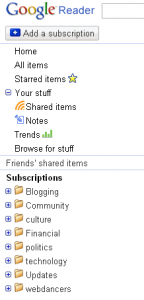
Google ReaderSo the idea is to keep an eye on the sites that interest you, without having to visit each one separately. Let’s take a look at the type of things you might want to monitor. The image at right was taken from my Google Reader screen. To save space, only my subscription categories are shown, not the individual feeds that I’m following. You can probably figure out the kinds of sites that are being followed in each category but a couple of them are worth special mention.

Community is for information that affects me locally. Blogs from my home town and organizations that I belong to.

Updates contains feeds from software and services that I use. For instance, by subscribing to the WordPress Development feed, I make sure that I don’t miss important updates to the software that powers this blog.

webdancers tracks all of the blogs that my company has developed for other people. All businesses can benefit from keeping track of work that they have done for others or by monitoring important voices in their field. Putting all of this information in one place means that you are much more likely to actually see it.

At the moment, I’m subscribed to 69 feeds. This number changes frequently, as I’m particular about what I subscribe to and it’s easy to add and drop feeds as necessary. In Google Reader, you can also share favorite items from your feeds, which automagically appear on a custom web page which, of course, has its own feed for your friends to subscribe to.

Once you start using feeds, you’ll start thinking about using the Internet in a different way. Instead of having to take a specific action (visiting a web site), you have an always-on connection to information that interests you. The feed reader is your side of the connection. On the other side are a myriad of data sources (just look for the little orange RSS icon or the word “feed”). All blogs have feeds and so do many other web sites and online services. I suggest you start with a few blogs and get in the habit of checking your reader regularly.

One last thing, don’t feel that you have to read every item that comes through your feeds. There’s a handy button at the top of the Reader labeled “Mark As Read” and there’s no shame in skipping as many entries as you want. You can be sure that there will be more later.

Technology Tagged: feeds, reader, rss

Humanizing Technology

September 13, 2009 By Greg Falken 2 Comments

audio_console

I like buttons that light up. I was about 15 when I walked into a real recording studio (Ike Turner’s Bolic Sound, in Inglewood, CA) and saw more lit up buttons than I had ever seen in one room before. The engineer in charge, whose name is now lost to me, was very generous with his time; explaining to me how the electrical signals in the recording chain are created by the air pressure changes that enter the microphones when sounds are made. These signals remain in the electronic realm until they are changed back into “sound” by the movement of speakers against the air. This “analog” between air pressure and electrical current is what distinguishes analog from digital recording (a moot point in 1973).

There’s a part of me that loves technology for its own sake, for the coolness factor, for the “ooooh” reaction that I have when, well, buttons light up. I’m sure that’s what originally drew me to the Internet. Now that I am (certainly) older and (hopefully) wiser, I am attempting to apply a more humanitarian view to my understanding and use of technology, particularly the use of the Internet. Here are a few thoughts on how to do this.

Use Your Online Voice

Many years ago, I took a performance class and the instructor told to, “sing as you speak”. In other words, if you’re not sure how to phrase or pronounce something in a song, think of how you would say it in your normal speaking voice. So too online do we need to speak in our natural voice. Techno-speak and sales-speak work very poorly here. If these arcane forms of speech are your natural voice, consider item two, below.

Speak To Be Understood

Closely related to using your online voice is tailoring your speech so that those that you’re speaking to can understand you. Avoid the use of words that your audience won’t understand. If you’re introducing new concepts, try and explain them using metaphors or examples. And if you must use acronyms, make sure they’re completely written out somewhere, at least once.

Sometimes being understood means not writing at all. Lately, I’ve been using screenshots and video screencasts as a substitute for writing out step by step instructions. The people that I’ve sent these to find it much easier to understand, say, how to upload documents to WordPress, when they can listen to me talk them them through the process as they watch it happen on their screen. I’ve been using Jing to create these and it’s dead simple.

Show Your Work

Very few ideas spring up out of nowhere (at least mine don’t). One of the great things about the web is the ease with which we can relate things to one another by linking to them. Using hyperlinks allows us to refer back to the source of an idea, provide additional detail or give credit where credit is due. They allow us to take part in the very human act of sharing, saying in effect, “if you’d like more information, take a look over here”.

These are just three ideas about how to humanize online technology. I’ll be writing more about this in the future and I’d love to hear your ideas too. Please add your comments.

Audio console photo by Steve Manson

Technology Tagged: audio, hyperlinks, Jing, screencast

« Previous Page

Stay in touch

Sign up to receive occasional email updates, including new blog posts.

As a web developer since 1995, I find my attention increasingly drawn to the intersection of computers, the Internet, communication and education. On this blog, I indulge my interest in these and several other topics. I hope you find them interesting too. Read More…

  • LinkedIn
  • RSS
  • Twitter
  • YouTube

Recent Posts

3 Words for 2021

January 1, 2021 by Greg Falken Leave a Comment

The message we should be hearing about masks: An aviation parable

October 24, 2020 by Greg Falken Leave a Comment

3 Words for 2020

January 1, 2020 by Greg Falken Leave a Comment

3 Words for 2019

January 1, 2019 by Greg Falken Leave a Comment

3 Words for 2018

January 1, 2018 by Greg Falken Leave a Comment

Latest Tweets

  • Just now
  • More on Twitter

Search

Tag Cloud

3 Words Aardvark audio bluetooth Chris Brogan Chrome computer contract Crazy Ivan education FCC flying Google google nexus home hyperlocal IndieWeb learning mobile mp3 music mvno net neutrality Network Sierra paleo phone politics posse primal programming QR code Rick Foster Sharon Crost sim skellie social media sonora Strawberry three words Tom Maguire Tuolumne twitter video WordPress writing

Return to top of page
Copyright © 2009–2026 · Website by Webdancers · Log in